
New · The first PMS with MCP
Your whole property. One system.
Front office, revenue management, channel manager, booking engine, website, Finance and POS on one database, and Revbot+ AI that reads it all through MCP. No more five logins, retyped bookings or rates copied by hand.
The problem
Most properties run on five systems that don't talk to each other.
Bookings typed twice
OTA reservations are copied into the PMS by hand, and one mistake means a double booking.
Rates changed everywhere
A new price has to go into the PMS, the channel manager, the booking engine and the website, one by one.
Reports from spreadsheets
Revenue numbers are exported and merged by hand, so decisions are made on yesterday's data.
Revbot+ fixes this at the root: every module reads and writes the same data. A booking from Agoda, a walk-in at the front desk and a direct booking on your website all land in one calendar, and one rate change reaches every channel.
Industry first · Revbot+ AI
The first PMS with MCP.
Model Context Protocol: the open standard that lets AI read your property's live data.
Read-only by design
AI can read your property's data. It can never change a booking, a rate or a bill.
Live data, not exports
Answers come straight from Revbot+ in real time: occupancy, arrivals, pickup, revenue, forecast.
One open standard
MCP is the open standard for connecting AI assistants to software, so there is no custom integration.
Private per property
Each property sees only its own data, behind your login and permissions.
Revbot+ AI · via MCP · read-only
What's our occupancy tonight?
92%: 11 of 12 rooms occupied. Revenue today IDR 9.1M, 4 arrivals still to check in.
How is pickup for next month?
38 room nights on the books, +12% on last year at this point. Weekends are filling first.
Example with demo data.
01 · PMS · Front desk
Front Office
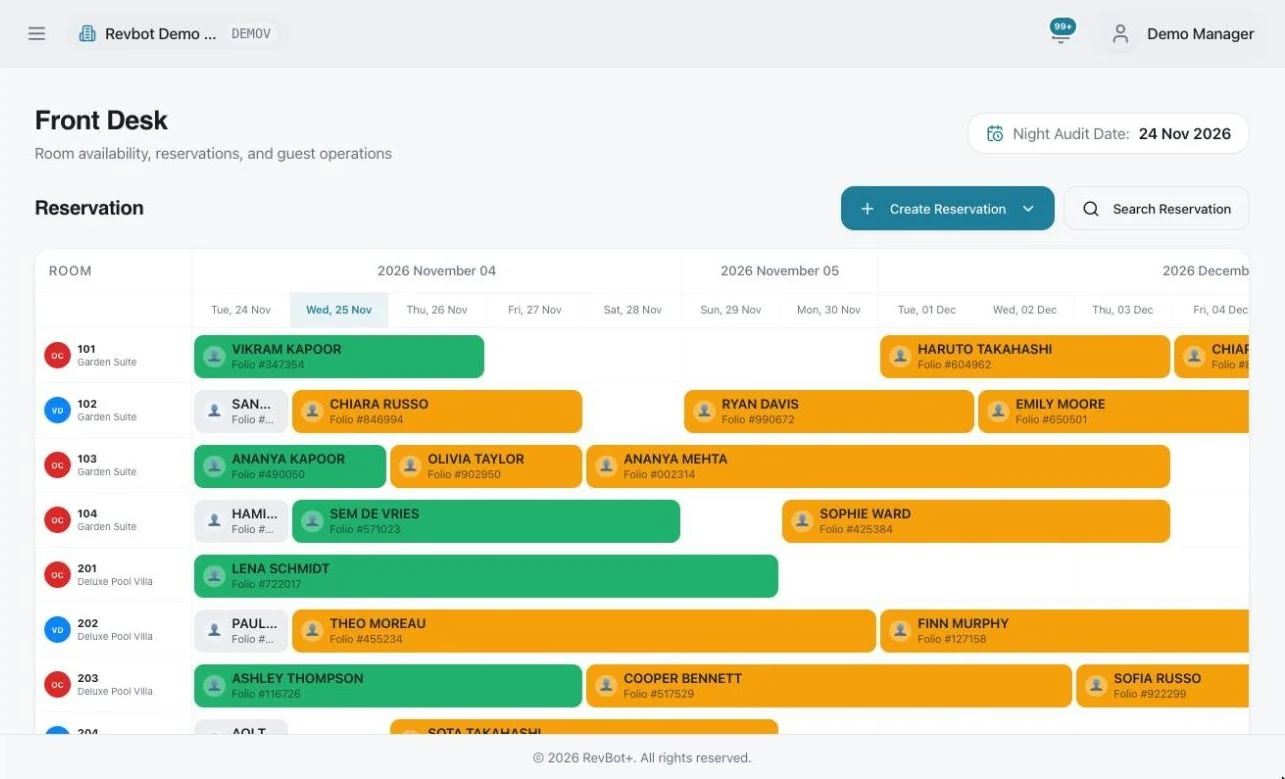
Everything your front desk does in a day, on one screen.
Reservation calendar
Every room and every stay on one calendar. Create, move and extend bookings in a few clicks.
Bookings list & search
Find any reservation by guest, date, source or status, and open it instantly.
Check-in & check-out
Arrivals and departures for the day, with guest details ready and the bill settled at check-out.
Folio & payments
Room charges, extras and payments on one folio per stay. Record deposits and split payments.
Invoices & print
Print or send registration cards and invoices straight from the reservation.
Guest profiles
Returning guests are recognised, with their stays and contact details in one profile.
Rooms, rates & taxes
Room types, rooms, rate plans, payment methods, taxes, sources, segments and agents in one setup.
Import from Excel
Bring your existing reservations in from a spreadsheet when you switch.
02 · RMS
Revenue Management
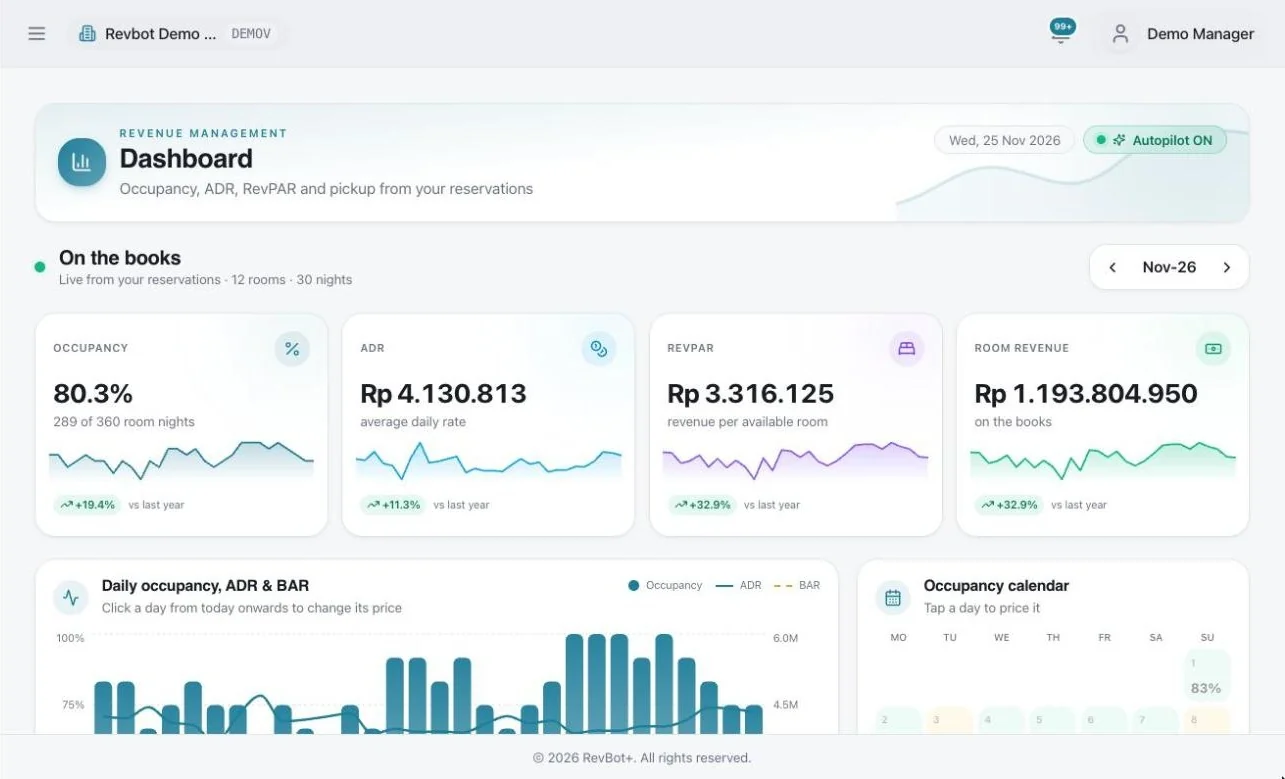
The right room rate, every day, using the bookings already in your front office.
Dashboard
Occupancy, ADR, RevPAR and revenue against budget and last year. Click the chart to change BAR.
Pace
How each month is booking compared with last year and budget, so you see a slow month early.
Corporate
Production per company and agent, to see which accounts really bring revenue.
Yield
Rates by date and room type, with clear suggestions where to move.
Logic
Your floor, ceiling and rules: the system never prices outside the limits you set.
Sync to channel manager
Push the new rates to every channel from the pricing table in one click.
03 · OTA connections
Channel Manager
Sell on the OTAs without double bookings or copying rates by hand.
OTA connections
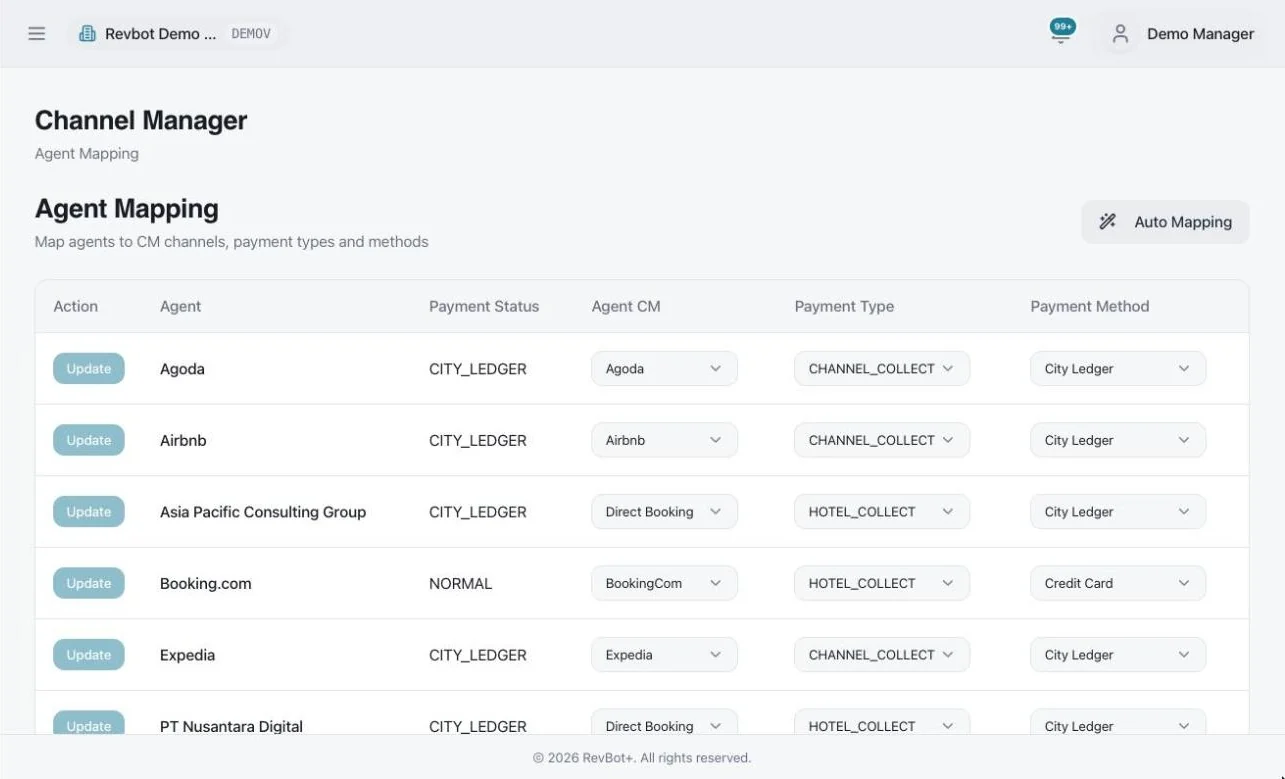
Connect Booking.com, Agoda, Expedia, Airbnb, Traveloka, tiket.com and more.
Room & rate mapping
Map every OTA room and rate to your own, once.
Inventory & rates sync
Availability and rates go out to every channel from one place.
Reservations in
OTA bookings arrive straight in the front office calendar, with the agent mapped.
Channel health
See at a glance whether every connection is working.
04 · Direct bookings
Booking Engine
Take direct bookings on your own website, from the same rooms and rates.
Room types & rate plans
Choose which rooms and rate plans guests can book directly.
Rate calendar
Set direct rates per room type and date.
Add-ons
Sell extras with the booking: breakfast, transfers, packages.
Promotions
Promo codes guests enter on your booking page, with dates and limits you control.
Online payments
Guests pay by card or QRIS when they book; your share is paid out to your bank account.
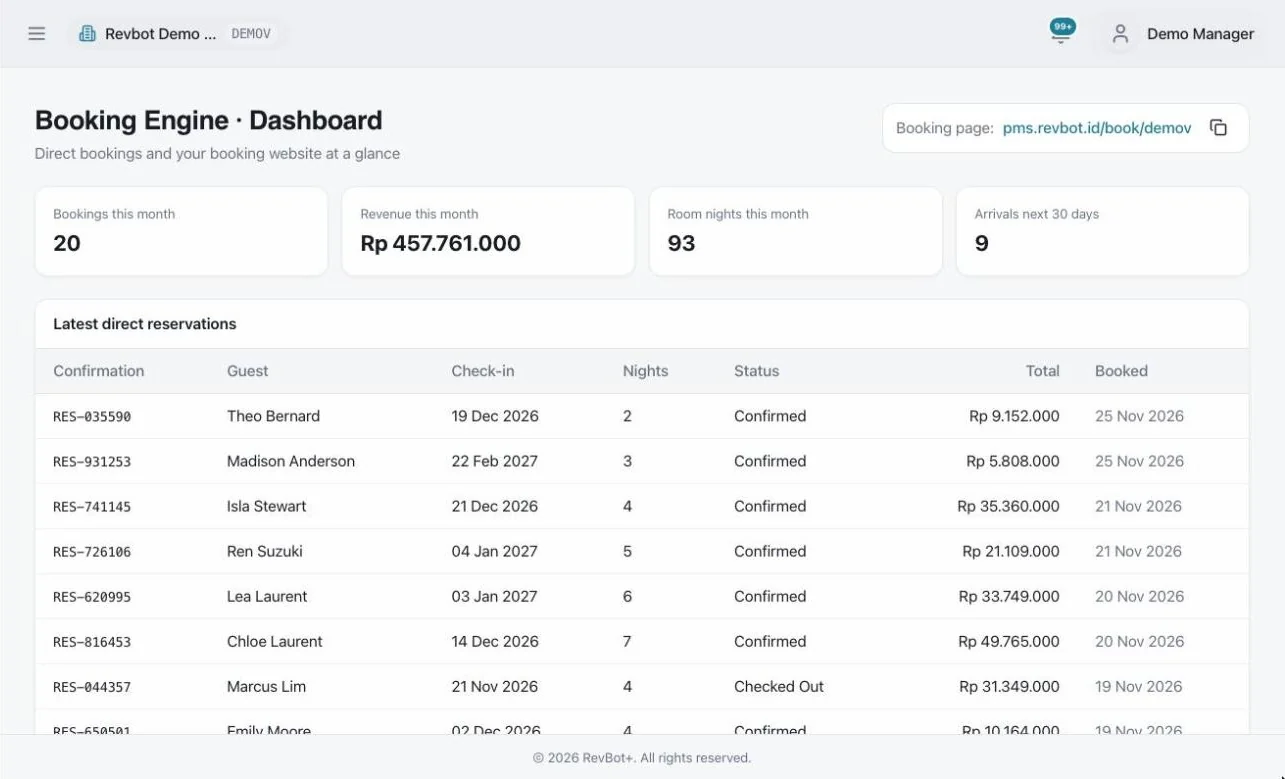
Direct reservations
Every direct booking lands in your front office, with its own dashboard.
05 · Your property website
Website
A property website with live rates and a book-now button, managed from the same system.
Publish in a few steps
Pick a template, add your address or your own domain and publish.
Content & photos
Headline, description, amenities, policies and a photo gallery with a cover photo.
Contact & map
Phone, WhatsApp, email, Google Maps and your social media.
Your brand
White label: your property name, logo and colours.
Analytics & SEO
Google Analytics, Tag Manager and Meta Pixel built in, plus search engine titles and descriptions.
Live rates
Rooms and prices come straight from the booking engine, always up to date.
06 · Accounting
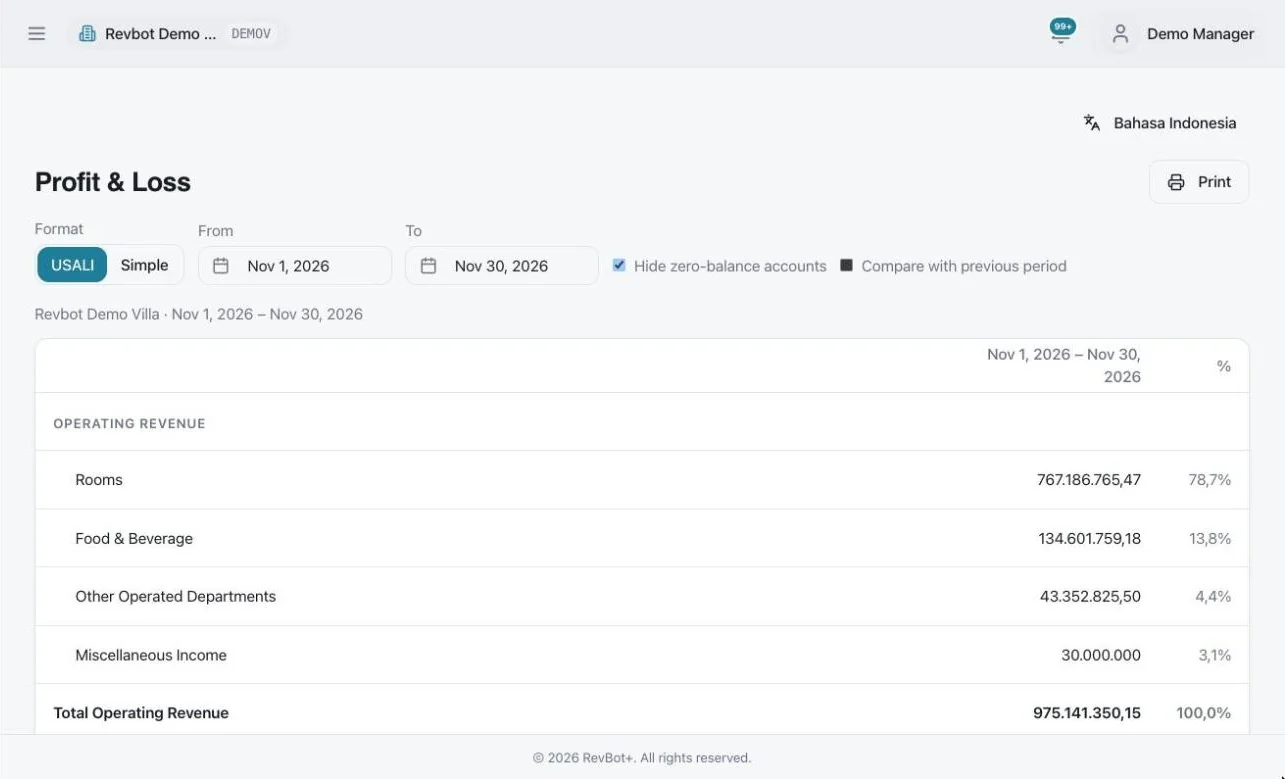
Finance
Full accounting that posts itself from the front office and POS, with reports your owner and accountant trust.
Automatic posting
Room revenue, payments, taxes and POS sales post to the right accounts every hour, with no retyping.
Daily revenue report
Today, month to date and year to date per department, ready every morning.
Financial statements
Profit & loss, balance sheet and cash flow, per property or consolidated across properties.
Sales & purchases
Invoices, receivables, purchases and payables with due dates and ageing.
Expenses & requests
Staff request expenses with a receipt photo from the app; managers approve or reject.
Cash, bank & reconciliation
Cash and bank accounts, bank statement import and reconciliation.
Chart of accounts & taxes
A ready chart of accounts for properties, PB1, service charge and VAT set up once.
Period closing
Trial balance, general ledger and month-end closing that locks the books.
07 · Restaurant, bar & shop
POS
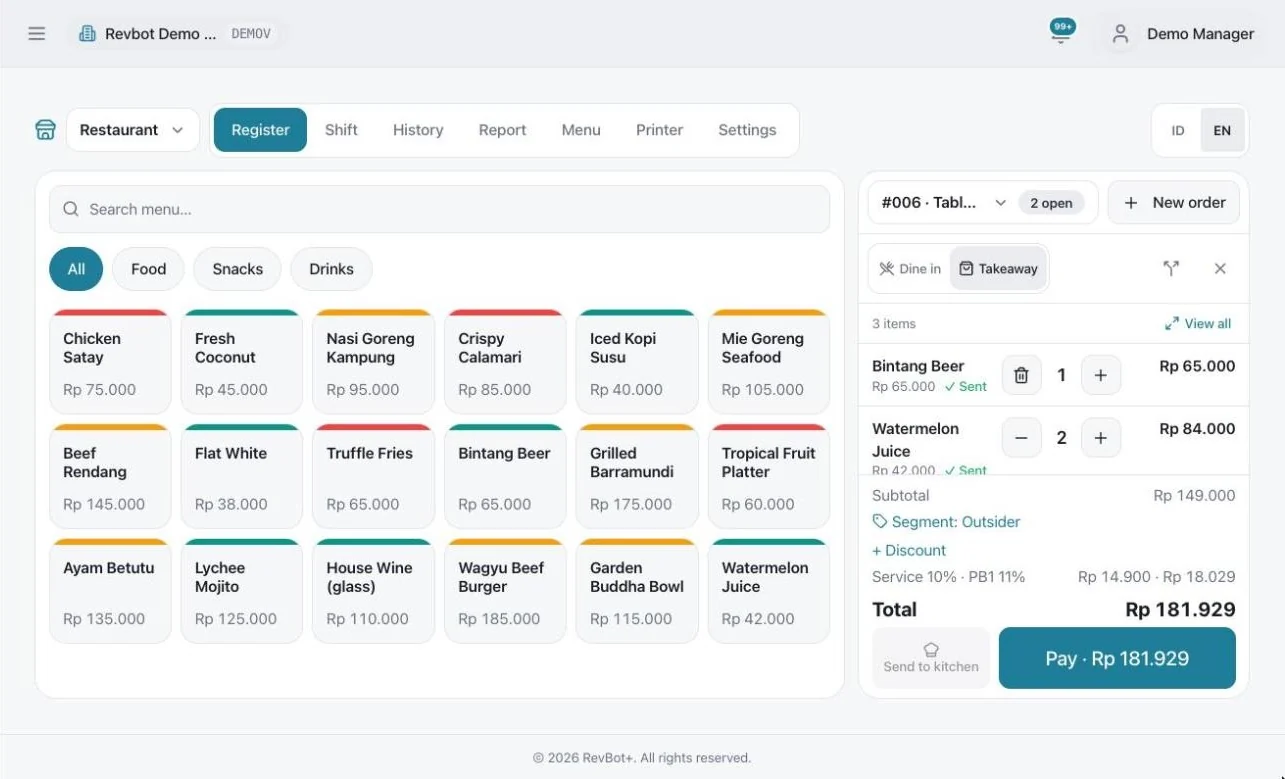
Take orders, send them to the kitchen and charge them to a room, connected to the front office and Finance.
Register
Tap menu items into an order by table or takeaway, with modifiers, notes and discounts.
Kitchen & bar tickets
Orders print at the kitchen or bar printer the moment they are sent.
Charge to room
Put a bill on the guest's folio in one tap; it appears at check-out.
Cash, card & QRIS
Split payments, cash rounding and change, card and QRIS in one screen.
Shifts & reports
Open and close shifts with a cash count, and see sales per item, category and cashier.
Menu management
Categories, prices, sold-out items and kitchen or bar station per item.
Also included
Built for how properties really work.
Android & web app
Owner dashboard, front desk, Finance and POS on your phone, with shortcuts to the screens you use most.
Multi-property
Switch between properties in one account, each with its own setup.
Users & permissions
Give each team member access only to the modules they need.
Two-step login
Extra login security for your team.
Email & WhatsApp
Booking confirmations and notifications to guests and your team.
Cloud-based
Nothing to install. Works in the browser on any computer.
Separate tools vs Revbot+
One system instead of five.
| Separate tools | Revbot+ | |
|---|---|---|
| Systems to log in to | 4 to 5 separate tools | ✓ One |
| Rates updated | By hand, in every system | ✓ Once, sent to every channel |
| OTA bookings | Retyped or synced between vendors | ✓ Straight into the calendar |
| Revenue reports | Exported and merged in a spreadsheet | ✓ Live, from the same data |
| Direct bookings | Separate booking engine and website | ✓ Built in, same rooms and rates |
| Support | A different vendor for each part | ✓ One team |
Pricing
Simple pricing per property.
Front office, channel manager and RMS in one price. Add Finance, POS, the booking engine or a website when you need them. Paying yearly? You pay 11 months.
Revbot+ core
Rp 450.000 / month
for up to 4 rooms, excl. 10% VAT (PPN)
+ Rp 75.000 / month for each room from the 5th
- ✓ Front office (PMS)
- ✓ Channel manager
- ✓ Revenue management (RMS)
- ✓ Android & web app, Revbot+ AI with MCP
Add-ons
Examples (core, per month, excl. PPN)
2 rooms
Rp 450.000
10 rooms
Rp 900.000
20 rooms
Rp 1.650.000
30 rooms
Rp 2.400.000
Revbot+ core
USD 29 / month
for up to 4 rooms
+ USD 5 / month for each room from the 5th
- ✓ Front office (PMS)
- ✓ Channel manager
- ✓ Revenue management (RMS)
- ✓ Android & web app, Revbot+ AI with MCP
Add-ons
Examples (core, per month)
2 rooms
USD 29
10 rooms
USD 59
20 rooms
USD 109
30 rooms
USD 159
Price calculator
What would your property pay?
Add-ons
Your estimate
Prices exclude 10% VAT (PPN), added at checkout. Booking engine: 5% per direct booking, only when you get bookings. For a property website, contact us for a quote.
Sign up & pay3-day money-back guarantee on your first payment
Pay online, then a setup wizard walks you through every module.
How to start
01
Sign up & pay
Choose your rooms and modules, create your account and pay online: bank transfer, virtual account, QRIS, e-wallet or card. Not happy? Full refund within 3 days.
02
Follow the setup wizard
A step-by-step wizard for every module in your plan: rooms, rates, channels, booking engine, POS and Finance. Our team helps when you are stuck.
03
Go live with support
Your team is trained and supported by the same people who built the system.
FAQ
Questions owners ask us.
Do I need all seven modules?+
No. Revbot+ is one system, and we switch on the modules your property needs. You can start with the front office and add the rest later.
Can I keep my OTA listings?+
Yes. Your listings stay on the OTAs; Revbot+ connects to them and takes over availability, rates and reservations.
Can I use my own domain for the website?+
Yes. Publish on a Revbot address or connect your own domain.
How do I move from my current system?+
We set up your rooms, rates and channels with you, and bring your future reservations over (also from Excel) before you go live.
Can I get my money back?+
Yes. Your first payment has a 3-day money-back guarantee: if Revbot+ is not right for you, ask for a full refund under Subscription within 3 days of paying. The channel manager opens when those 3 days end, or straight away if you choose to give up the refund to connect your OTAs sooner.
Is there a mobile app?+
Yes, Revbot+ runs on Android and in the browser. The iOS app is coming soon.
What is MCP?+
MCP (Model Context Protocol) is the open standard that lets an AI assistant read data from software. Revbot+ is the first PMS with MCP built in, read-only: Revbot+ AI answers from your live data but cannot change anything.
What does it cost?+
Front office (PMS), channel manager and RMS: Rp 450.000 a month for up to 4 rooms, plus Rp 75.000 a month for each room from the 5th. Finance and POS are Rp 500.000 a month each, the booking engine is 5% per booking, and for a property website, contact us for a quote. Paying yearly costs 11 months. Prices exclude 10% VAT (PPN). Outside Indonesia prices are in US dollars.
Run your whole property from one place.
Sign up in a few minutes, pay online, and the setup wizard walks you through every module.